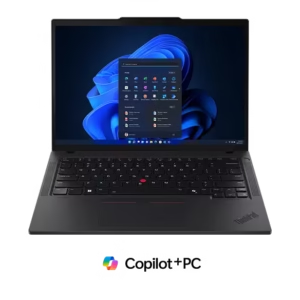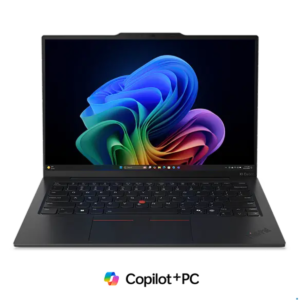
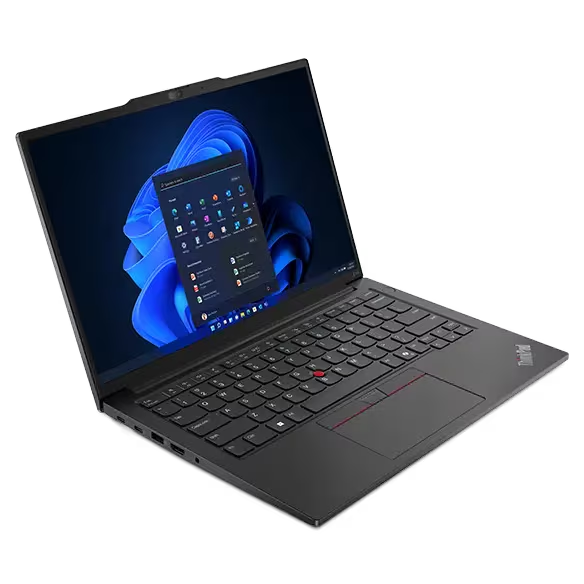
The Lenovo ThinkPad E14 Gen 6 answers a question many SMB
buyers ask: can you get a real ThinkPad — with the keyboard,
the build quality, and the business features — for under $800?
The E14 Gen 6 says yes.
It’s Lenovo’s entry-level ThinkPad, designed specifically for
small businesses, growing teams, and budget-conscious
organizations that need professional-grade reliability without
the premium price of the X1 Carbon or P14s workstation.
Intel Core Ultra processors make it AI-ready, the ThinkPad
keyboard makes it a pleasure to type on, and the price makes
it accessible to teams at any stage.
Key Specifications:
Spec | Detail
Processor | Intel Core Ultra 5 125U / Ultra 7 155U
Graphics | Intel integrated graphics
Memory | Up to 32GB DDR5 5600 MT/s
Storage | Up to 1TB PCIe NVMe SSD
Display | 14″ WUXGA 1920×1200 — anti-glare IPS
OS | Windows 11 Pro (included)
Wireless | Wi-Fi 6 + Bluetooth 5.3
Ports | 2x USB-C, 2x USB-A, HDMI, headphone
Security | Fingerprint reader — Windows Hello
Keyboard | Backlit ThinkPad keyboard
Battery | Up to 46Wh — all-day productivity
The ThinkPad Difference at an Entry Price
The E-series is where Lenovo brings the ThinkPad experience
to a more accessible price point. What carries over from the
premium ThinkPad lineup:
The keyboard — the same deep-travel, precise-feedback
ThinkPad keyboard that professionals rely on. For teams
that type all day, this is the most important spec on any
laptop and the E14 Gen 6 doesn’t compromise it.
The build quality — solid chassis construction that handles
daily professional use reliably. Not MIL-SPEC like the
X1 Carbon or L15 Gen 4, but built to last the working life
of a business laptop.
The security basics — fingerprint reader for Windows Hello
passwordless login, TPM security, and BIOS-level
protections are standard across the ThinkPad line
including the E-series.
Intel Core Ultra — AI-Ready at Entry Price
The E14 Gen 6 runs Intel Core Ultra Meteor Lake processors
— the same generation found in much more expensive
business laptops. The integrated NPU handles AI-accelerated
tasks natively, making this laptop Copilot+ compatible and
ready for AI tools embedded in Windows 11 Pro and
Microsoft 365.
For teams adopting AI-assisted workflows — writing tools,
meeting transcription, data analysis — having hardware
that handles it natively matters, even at entry price points.
WUXGA Display — Better Than Standard FHD
The 14″ WUXGA (1920×1200) display gives a taller 16:10
aspect ratio compared to standard 16:9 FHD panels. The
extra vertical space makes a real difference for document
editing, spreadsheet work, and web browsing — more
content fits on screen without scrolling, reducing fatigue
during long working sessions.
Who Is This Built For?
The ThinkPad E14 Gen 6 is the right laptop for:
Budget-conscious SMBs equipping staff with professional
hardware where cost per unit is the primary constraint —
without dropping to consumer-grade quality.
First-time business laptop buyers transitioning from
consumer hardware who need ThinkPad reliability at a
price that doesn’t require a large upfront investment.
Administrative and support roles — reception, HR,
operations, customer service — where the workload
is Office, email, video calls, and browser-based tools
and the keyboard quality matters more than raw performance.
Growing teams deploying multiple units where the per-unit
cost difference between E14 and L15/X1 Carbon adds up
significantly across 10 or 20 machines.
E14 Gen 6 vs ThinkBook 14 Gen 7 — Which Do You Need?
Both are in a similar price range. Key differences:
The ThinkPad E14 Gen 6 is a true ThinkPad — with the
keyboard, the brand heritage, and the ThinkPad-specific
security features. Choose it if the ThinkPad keyboard
and brand matter to your team.
The ThinkBook 14 Gen 7 has a more modern aluminum
design, DDR5 memory, and AMD Ryzen 7000 AI processing.
Choose it if modern aesthetics, the aluminum chassis,
and AMD performance are priorities.
Both are solid entry-level business choices — the
ThinkPad name carries weight in professional environments
and the E14 Gen 6 delivers it at an accessible price.
Why Order Through PST?
PST sources all hardware through authorized OEM channels
with full manufacturer warranty. For the ThinkPad E14 Gen 6,
we offer single unit and fleet orders, PO invoicing and
NET terms for approved accounts, and configuration
consultation at no charge.
For teams deploying 5, 10, or 20 entry-level units,
volume pricing is available — contact PST for a fleet quote.